
current edition noumer: 0.99.1.260107
All kinds of one particular edition of VJAZ contain fully operational VJAZ, and have common core functionality. The first kind of edition is the most simple, and available if terms of License for use are accepted by user during the first launch of the program. In archive of one edition for one platform, there are two, colored and non-colored, VJAZ executables.
core functionality
this edition includes:
|| linux / windows / macintosh, 64-bit ||
this edition includes:
|| linux / windows / macintosh, 64-bit ||
this edition includes:
|| linux / windows / macintosh, 64-bit ||
this edition includes:
general information

VJAZ is an intermedial mean for the mind of a human, when he exercise his own perception that is given to him singularly and once. A body of grown and developed mind of a human, a body that is possessed by the mind as its own, instantiates to the mind in notions; thus, the ability to under-stand of seemingly thinking human is delimitated by the body of his mind, by notions, substance of which is exercised by i, the enholdment of appearing visions and given presences. At the root, VJAZ is trinery-folded; intertwining, it builds off quantity, speech, and rhemah, which take their origin from yukah, which by itself originates off ennoia.
[ These strangely sounding names, «rhemah», «yukah», «ennoia», may be hard to comprehend in english, since they were made through transliteration from russian names «ремь», «юка», «инея», which all related to other russian names; more detailed explanation on these terms could be found in VJAZ guidebook and information section, but conceptually, in simple words, rhemah is related to time, yukah to mind, and ennoia to s.c. «i». ]
The ennoia, being equally the origin of the body of perception of each human, and being equally given to each human, exists singularly throughout multitude; quantity, speech, and rhemah, which are all derivatives off ennoia, finitely inherit such singularity, and are equally given to perception of each human, with no dependance on known limitations that had initially occured not from the origin of life.
The ennoia uniquely holds all stances of givenness with no exclusion, including human perception, of which ennoia is the primary trait; derived from it quantity, speech, and rhemah, finitely inherit this quality: quantity holds all stances at length, in volume; speech holds all stances by their essence; rhemah holds actuality of each stance.
One separate perception, being a part of the givenness, is, therefore, a subject for to be taken in number, by essence, and within actuality. VJAZ is made for that.
__
The prevailing trait of yukah, for which it was initially created, is such, that, being essentially singular, yukah may hold unitemporaly more stances, than that may unitemporaly do one ennoia; this advantage is gained for the cost of disadvantage, which is so, that yukah does not hold all stances with no exclusion, because it does not hold ennoia itself.
Yukah, as a stance primarily deriving by human off ennoia, being alienated, by alienatable essence of any stance, from primarily-given stantial body of perception (i.e. not being ennoia even when yukah is inscribed with a blade right on the ennoia), is obtained altogether within body of mind, as the primary and core notion of mind; the thinking as activity, being embodied by means of notions, is only a part of the perception as activity, because the thinking develops only insofar as the perception is mastered by a human. In other words, as is the yukah, being a notion within the body of mind, holds all stances except ennoia, so is the thinking, being within activity of the perception, covers all activity of perception except activity of 'i'.
Since yukah does not lay within primarily-given bodiness, and since any notion (in this case, yukah) is made by enholdment of visions and presences, — the visible, formal, stantial embodiment of yukah may appear differently; by all ancient evidences, as such and so that had been, till the end of 15th century AC, when, finally, certain forms were established by first typographers.

Establishment, acceptance, spread, affirmance in everyday life - of forms for yukah, was the exceptional happening, because yukah, while it had continuously existed in various forms because of transgressions, was not clearly true yukah, because it had not kept one of the highest traits of the highest quality of ennoia, which is expressed in its singularity that is given throughout multitude, which is the formal expression of ennoia's enholdment of all stances of givenness.

Being established in formal unity, yukah has gained possibility to be uniformly affirmated in various bodies of mind, and to become central notion in separate perceptions of persons from different nations. And as so that has happened, and mostly, it happened through means of applying yukah, through its established forms, to master three most sustainable sides of actuality that are given to every perception. Since yukah is a part of the body of mind, the mastering of named sides can be done only by means of the mind; thus, the activity of mind had derived new notions from yukah and actuality: quantity, speech, rhemah.

Lastly, quantity, speech, rhemah, being already part of the body of mind, also invariably became part of the perception. And since quantity, speech, rhemah, being three most sustainable sides of actuality, altogether cover many stances, among which there are also separate traits of perception, - the given perception itself may be examined through-with quantity, speech, rhemah, if it is held uniformly by means of yukah.

In relation to quantity, VJAZ propounds in its commands a possibility to firmly and precisely outline the space and the volume of perception.
In relation to speech, VJAZ propounds in its commands a possibility to effectively and deliberately choose the essence and qualities of perception.
In relation to rhemah, VJAZ propounds in its commands a possibility to unially and uniquely expound the activity and the actuality of perception.
Such are the goods; what is to say on the matter of commands themselves, there are, firstly, more than three of them, and secondly, each of them in some way gives all three posssibilities, because the root of VJAZ is inseparable in its intertwinement.
__
To operate with VJAZ, firstly, the calculator with a screen, a keyboard, and a control shell (s.c. «terminal», «console», «command line») is needed; secondly, one of the most spread operative systems is needed, namely, Linux, Windows, or Macintosh, with 64-bit architecture; 32-bit operative systems are not supported directly.
These days, only Linux systems do not necessitate any additional moves to run VJAZ; within Macintosh systems, it is needed to manually give permissions to run VJAZ, while within Windows systems it is a must to install additional software.
VJAZ always is launched through the window of control shell. the controlment of VJAZ is performed with keyboard operation, except scrolling the screen of the shell, which is more conveniently made with a mouse or a point-panel.
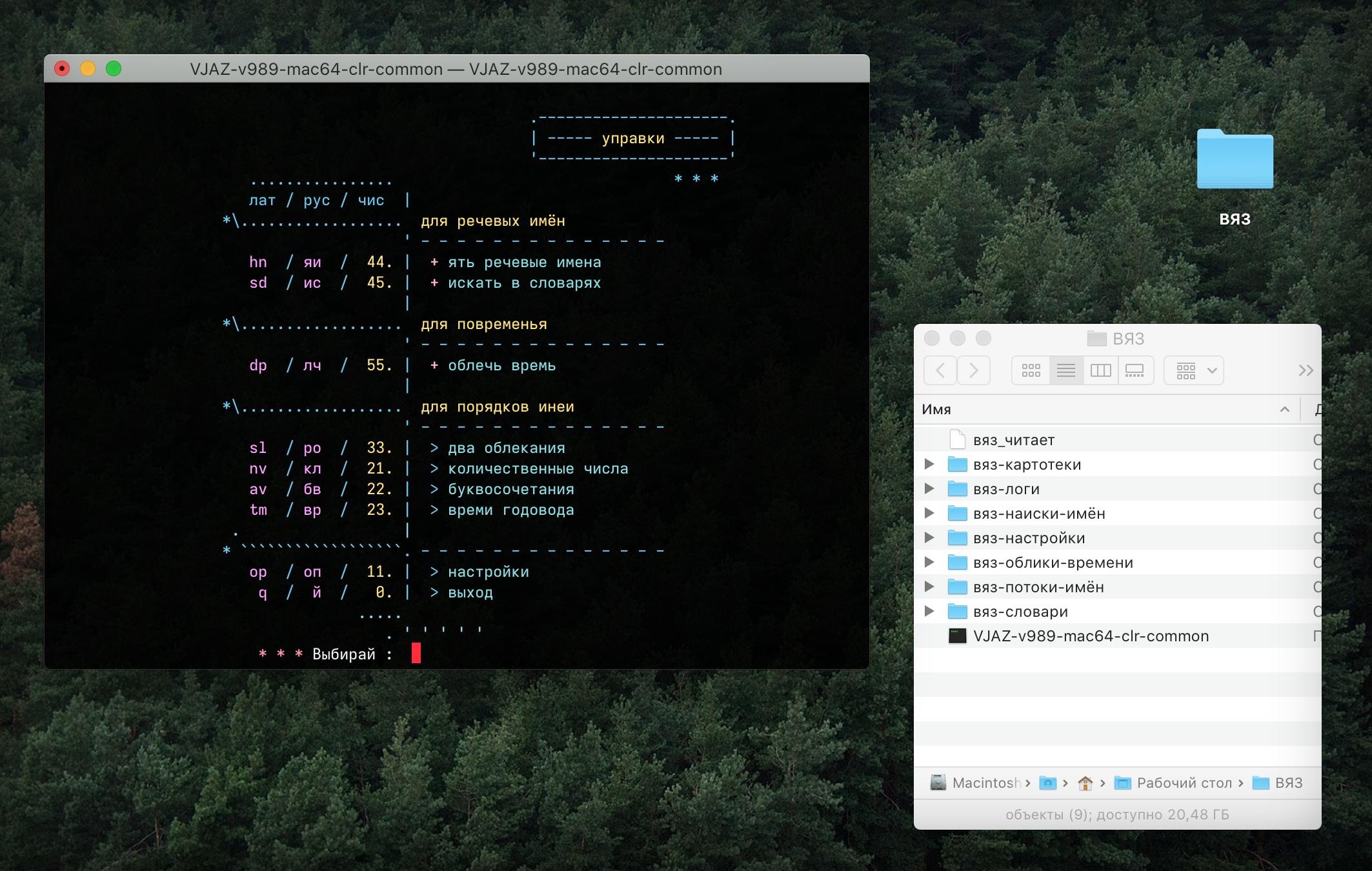
After the first launch, VJAZ deploys various files that are needed for its work, and later it works only with these files, and with files that are explicitly chosen by user. VJAZ does not do network transfer and does not need any network connection.
VJAZ is supplied in two types, full-colored and black-and-white. These types are the same in everything, except the sense that is expressed only with color. Non-colored VJAZ may be launched within Windows «command-line» with no additional software installations, but language encodings would be needed to be set up and optioned properly.
__
installing VJAZ
into Windows environment:
1. Download the archive with executable VJAZ files.
2. Download and install software bundle MSYS2, which has the control shell 'bash', that can process colors and has encoding sets for various languages.
3. Unpack the archive with VJAZ, choose colored ('clr' in the name of file), or non-colored ('noc' in the name of file) VJAZ and put it into a separate directory.
4. Launch the bash-shell of MSYS2.
5. Open the directory with VJAZ, and from there, drag-and-drop the icon of the executable file onto the window of bash-shell, then, in the window of bash-shell, press [ENTER].
6. Open options of window of bash-shell, choose font and color scheme from those that are present there.
7. Additionally, it is possible to setup launch of VJAZ through bash-shell by double-click; for that, right-click with mouse on the VJAZ file, choose the menu point «open in..», then check the box «always open in» and choose bash-shell of MSYS2 from the list of programs.
into Macintosh environment:
1. Download the archive with executable VJAZ files.
2. Unpack the archive, choose colored (clr) or non-colored (noc) VJAZ and put it into a separate directory.
3. Next, either (1): launch the terminal, drag and drop the VJAZ icon onto the terminal window and press [ENTER] in the terminal window; or (2): do not launch the terminal, and, pressing the button [option], right-click with mouse on the VJAZ file, then press in the menu the point «open», and then press «agree» in the appeared window to start the program.
4. In now opened terminal window, set up font and color scheme.
into Linux environment:
1. Download the archive, unpack it, delete the non-colored '-noc-' file, launch the colored one, then set up font and colors of the shell for your preference.
Font and coloring settings
font
the layout and pictures of VJAZ are all made with monospaced font, therefore the depiction is correct only when a font with equal width of signs is set. The most good fonts to set:
To set the font used by VJAZ, it is to open options of the control shell, and to choose desired font among those which are already installed in the system.
in Macintosh environment: 'terminal' -> 'options' -> 'profiles' -> 'text' -> 'font'; if the font Iosevka (Fixed SS03 Medium Extended) is already installed into the system, there is a prepared profile available for download down below, it sets the font and colors automatically.
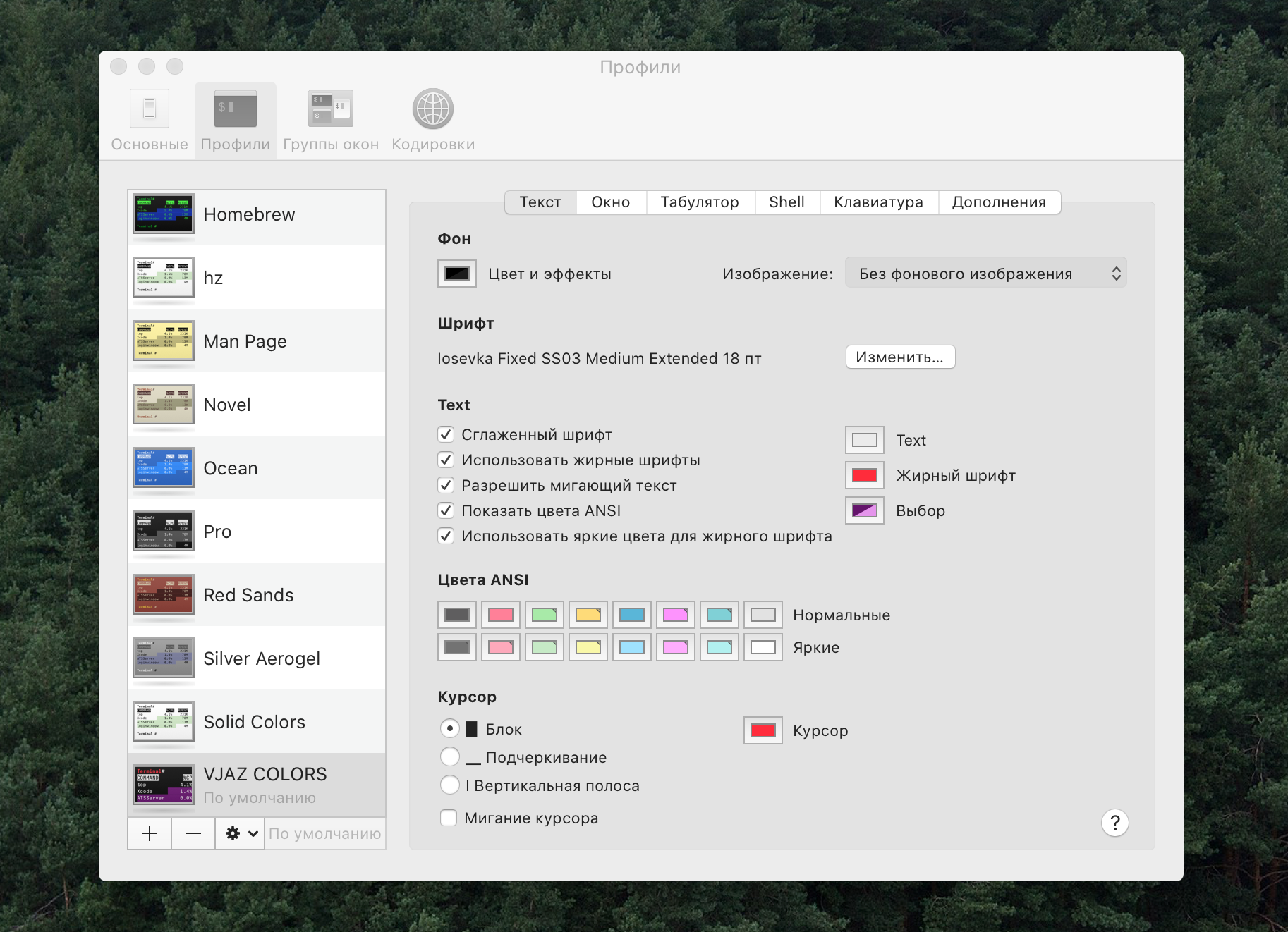
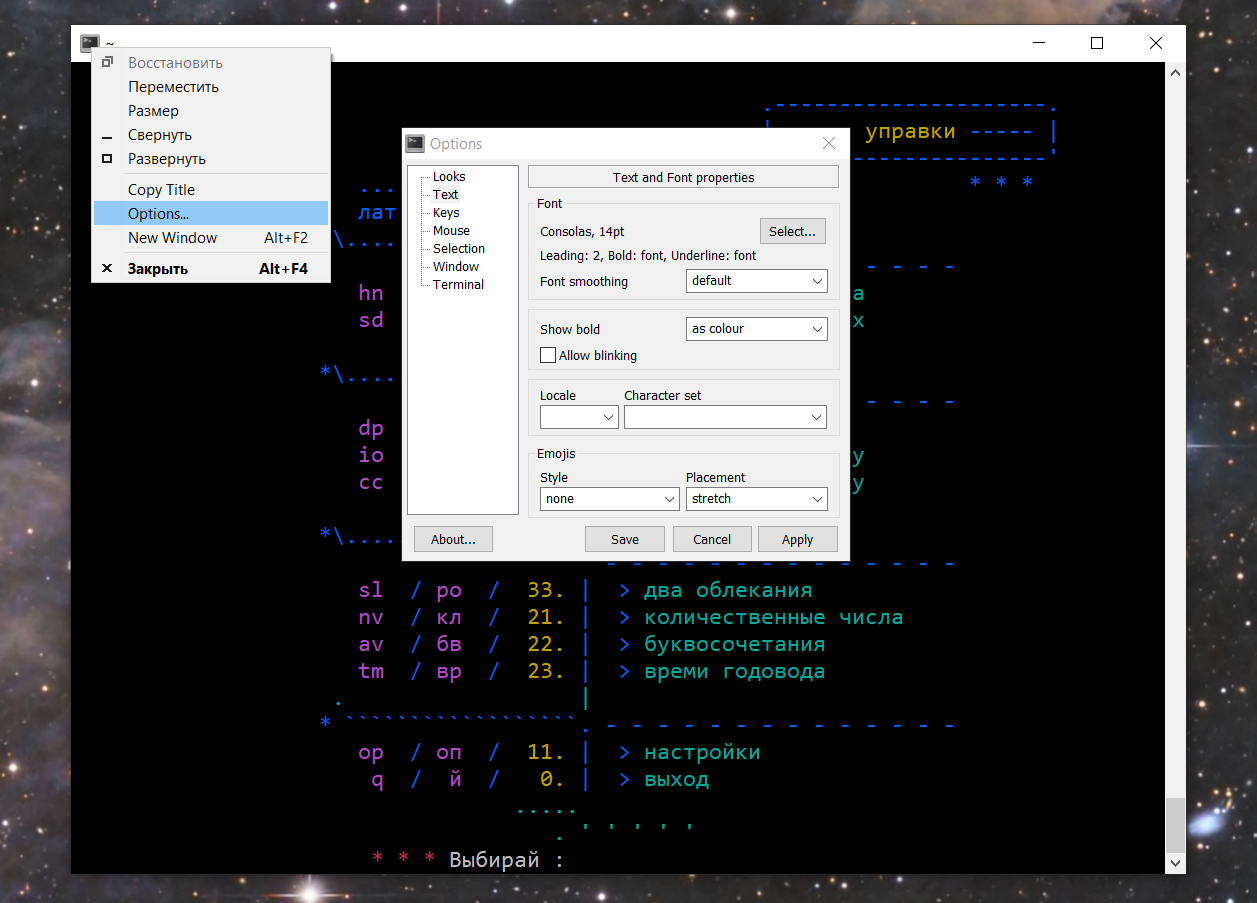
in Windows environment: through options of the shell from MSYS2 bundle, they are opened by right mouse-click on upper panel of shell window, then, to open: options -> text -> font; and there to choose the font.
in Linux environment: depends on control shell being used, shell options are opened differently.
colors
VJAZ colors are to be chosen deliberately in options, within limits of control shell being used. In Windows and Linux environments, for the most number of possible colors, the type of the terminal should be set to 'xterm-256color', which is in the options section by the label 'terimnal'; in Macintosh environments, the most color range is set by default. Initial coloring of VJAZ is made in these exact colors:
#4C4C4C#FF6685#A6EBA6#FFDC72#47A6D1#FF8FFF#7DD0D7#DBDBDB#737373#FFA8BA#C5EBC5#F9F9A5#8DDBFF#FFABFF#B0F0F0#FFFFFF
Colors may be set manually, by personal preference, or may be set with already prepared profiles which have all shades given above.
for Windows: presuming that 'MSYS2' is already installed, download color scheme with present shades, unpack archive and put the file into the directory by computer address C:\msys64\usr\share\mintty\themes\; after that, choose this scheme from the list in options of the terminal.
for Macintosh: download profile with given palette, unpack archive and launch the file by double-click, after that, choose this profile to be 'by default' in options of the terminal.
for Linux: color may be written in various ways, depending on control shell in use; here are two, in hexadecimal and in RGB encoding.
HEX codes
---------
Black: #4C4C4C;
Red: #FF6685;
Green: #A6EBA6;
Yellow: #FFDC72;
Blue: #47A6D1;
Magenta: #FF8FFF;
Cyan: #7DD0D7;
White: #DBDBDB;

BoldBlack: #737373;
BoldRed: #FFA8BA;
BoldGreen: #C5EBC5;
BoldYellow: #F9F9A5;
BoldBlue: #8DDBFF;
BoldMagenta: #FFABFF;
BoldCyan: #B0F0F0;
BoldWhite: #FFFFFF;
---------
RGB codes
---------
Black=76,76,76;
Red=255,102,133;
Green=166,235,166;
Yellow=255,220,114;
Blue=71,166,209;
Magenta=255,143,255;
Cyan=125,208,215;
White=219,219,219;

BoldBlack=115,115,115;
BoldRed=255,168,186;
BoldGreen=197,235,197;
BoldYellow=249,249,165;
BoldBlue=141,219,255;
BoldMagenta=255,171,255;
BoldCyan=176,240,240;
BoldWhite=255,255,255;
---------
Depending on screen characteristics, screen settings, abilities of light perception and color distinction, appearance of these colors may vary in vision, but since VJAZ apply colors to convey meaningful sense, full rejection of color layout to single-colored depiction will also exclude some details of the meaning.
__
What's new in the edition 0.99.1 (260107): 07.01.2026
Announcement: 15.12.2025
Editions extended and complete are finished and ready, but temporarily unavailable for purchase. The exhastive edition has around ~390 finished pages ready for publication, but at this moment the allover work is not done, and several hundreds pages are still work in progress. Please, support me to the extent you may do! On the matter of errors and bugs, reach me by mail 1@vjaz.one.
It is supposed that this page will be available at least till June 2026th; if during this timeframe the page is unavailable, then there is either some page maintanance going on, or server is down and to be back soon.
Addition for native and non-native english-speakers:
To translate everything into english and to maintain it after, is quite a tedious task to do, but I took it and have been doing it manually, without any use of automated tools, to provide as best meaningful 1-to-1 translation as I only can, to english-speakers all over the ball.
While original work was made in russian, and by now, to me, it makes most sense in russian, the initial reason to maintain complete english translation stays not fully clear; but I decided to do that anyway, for the sake of good manners, since I know english enough to do that.
Further, I have intentionally left space to add more translations, but that is, firstly, beyond my present ability, since I have mastered only two languages well-enough this far, and secondly, would slow down dovelopment significantly.
Now, I can say that all the translation I did this far, actually makes sense in english, even though I admit that it has less easy-to-pick-up key terms, which are not very comfortable to operate with. Aside mistakes and typos I may had made, there is space for improvements in terminology. I hope this inconvenience is not an obstacle for to reason through the substance of given work.
to support